
If you’ve spent any time inside Ads Manager, you’ve probably noticed that picking one interest and calling it a day does not always create the most relevant audience. That’s where the idea of narrowing your audience comes in. In traditional manual targeting, advertisers could layer multiple conditions so that people had to match multiple criteria before becoming part of the selected audience. This worked through an AND logic, where each additional layer could reduce the potential audience size.
However, with Meta’s current Advantage+ Audience system, many targeting inputs such as interests, demographics, and behaviors may be treated as audience suggestions that help Meta find potential customers rather than strict limits.
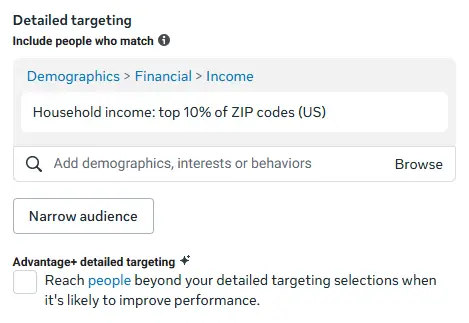
1. What Does Audience Narrowing Actually Mean in Meta Ads?
At its core, audience narrowing is a targeting method that lets advertisers take a group of people defined by one or more targeting selections and refine it by adding additional conditions. Instead of reaching everyone connected with a fitness interest, advertisers can combine additional signals such as weight-loss interests, relevant demographics, or other available targeting options to create a more specific audience definition.
Audience narrowing is closely associated with Detailed Targeting because advertisers commonly use available demographics, interests, and behaviors as the conditions they combine. In Ads Manager, narrowing is essentially a way to combine available targeting selections to refine how an audience is defined.
Example
Suppose you are advertising running shoes.
Your first targeting group contains: Running OR Jogging
You then use Narrow Audience to add: Fitness
In a manual audience setup where these selections function as restrictions, the logic becomes:
(Running OR Jogging) AND Fitness
A person needs to match the first group and also meet the additional Fitness condition.
2. Why Layering Conditions Changes Your Audience Size
Every time you add a new condition through a separate narrowing layer, you’re asking Meta to find the overlap between two or more groups rather than showing your ad to either group individually. That overlap is generally smaller than the individual groups on their own.
For example, a basic audience built around a Running interest might be relatively broad. If you use Narrow Audience to add Fitness, the manual targeting definition becomes more specific because the person must match both conditions. However, it is important to distinguish between adding multiple options to the same targeting group and adding a separate narrowing layer.
2.1 Same targeting group
Running OR Fitness OR Jogging: A person can match any of the selected options.
2.2 Narrowing layer
(Running OR Jogging) AND Fitness: The second group adds another condition.
2.3 Additional narrowing layer
(Running OR Jogging) AND Fitness AND Online Shopping: Each additional layer makes the definition more restrictive when those targeting controls function as restrictions.
With Advantage+ Audience, however, selected targeting inputs may instead act as audience suggestions. Meta can expand beyond those suggestions when its system predicts that doing so may improve performance.
3. How the Narrowing Process Works in Practice
Setting this up inside Ads Manager typically looks like this:
- Choose available Detailed Targeting options such as interests, demographics, or other available audience signals as the foundation.
- Use the Narrow Audience option to add an additional condition when using manual audience controls.
- Add another narrowing layer only when it represents a meaningful characteristic of the intended customer.
- Watch the estimated audience size update as targeting conditions are added. In manual audience setups, each additional condition normally makes the audience definition more restrictive.
- Remember that with Advantage+ Audience, the final delivery audience may be broader because Meta can use selected targeting inputs as suggestions rather than strict restrictions.
Example
An advertiser selling premium running shoes could create a manual targeting definition such as:
First group:
Running OR Jogging
Narrow Audience:
Fitness
Narrow Further:
An available shopping-related audience signal
The idea is to identify people who share several characteristics relevant to the product.
However, adding more layers simply to make the audience smaller is not necessarily beneficial.
4. Types of Layering You Can Build
4.1 Interest-Based Layering
This is one of the most common approaches to combining related interests to identify people with multiple relevant signals.
For example, a business selling running shoes could combine:
Running OR Jogging
with a narrowing condition such as:
Fitness
In a manual targeting setup, this creates an audience based on the overlap between these signals.
4.2 Demographic Layering
Here you combine available demographic targeting options with interests or other available targeting signals.
For example, a business-focused advertiser could combine an entrepreneurship-related interest with an available demographic criterion where that option exists in the account and region.
The important point is to use demographic conditions only when they represent a meaningful characteristic of the intended customer.
4.3 Behavior-Based Layering
This approach combines available behavior-related audience signals with relevant interests where those options exist.
For example, an advertiser selling fashion products could combine:
Fashion-related interest
with an available shopping-related signal.
However, advertisers should remember that Meta’s available targeting categories change over time, and not every historical behavior category remains available.
4.4 Location-Based Refinement
Location is a separate audience control rather than simply another Detailed Targeting narrowing layer.
For example, a local gym could select:
Location:
A specific city or service area
Detailed Targeting:
Fitness OR Health & Wellness
This allows the advertiser to define the geographic area separately while using relevant audience signals to help identify potential customers.
5. Real Examples Across Different Business Types
5.1 E-commerce: Premium Running Shoes
A running shoe business could use:
First group:
Running OR Jogging
Narrow Audience:
Fitness
The goal is to identify people whose available audience signals are relevant to the product.
5.2 Education: Digital Marketing Course
An advertiser promoting digital marketing training could use:
First group:
Digital Marketing OR Online Advertising
Narrow Audience:
Entrepreneurship
This creates a more specific audience definition in a manual targeting setup.
5.3 Local Business: Gym Membership
A gym could use:
Location:
Its service area
Detailed Targeting:
Fitness OR Health & Wellness
This combines geographic targeting with relevant audience signals.
Each example follows the same principle: the targeting layers should reflect traits your actual customers share, not simply categories that sound related.
6. How Many Layers Is Too Many?
There’s no fixed rule for the ideal number of layers. The right number depends on your product, audience size, market, budget, and campaign goal. A practical approach is to add a condition only if it genuinely represents a characteristic of your ideal customer.
For example, if you’re selling running shoes, adding Running + Fitness may make sense. Adding several unrelated interests simply because they are available in Ads Manager may make the audience definition unnecessarily restrictive.
The goal is not to create the smallest possible audience. The goal is to create an audience that is relevant and large enough for effective delivery and optimization.
7. Mistakes Advertisers Commonly Make With This Feature
- Stacking too many layers: Adding too many conditions can make a manually defined audience unnecessarily restrictive.
- Combining unrelated interests: Two interests may appear individually relevant but have little connection to the actual customer.
- Over-restricting the audience: A smaller audience is not automatically a better audience.
- Narrowing without understanding the customer: Targeting should be based on actual customer characteristics rather than assumptions.
- Assuming narrowing always improves performance: Additional restrictions can sometimes remove people who could have become valuable customers.
- Treating Advantage+ Audience like traditional manual targeting: Targeting inputs in Advantage+ Audience may act as suggestions rather than strict limits, so advertisers should not assume that every selected condition will restrict delivery.
8. Best Practices Worth Following
- Start with a clear picture of your ideal customer before choosing targeting options.
- Only combine interests, behaviors, or demographic options that make logical sense together.
- Use each narrowing layer for a meaningful reason.
- Test different targeting combinations when appropriate.
- Review campaign performance regularly.
- Avoid making audiences unnecessarily small.
- Do not add restrictions simply because they are available in the targeting menu.
- Understand whether your current setup uses Advantage+ Audience or Original audience options before interpreting targeting selections as strict restrictions.
9. How This Fits Into Meta Ads Today
Audience narrowing needs to be understood differently in the current Meta Ads environment.
Meta has increasingly moved toward AI-driven audience delivery through Advantage+ Audience, where advertisers provide audience signals and customer information while Meta’s system searches for people most likely to achieve the campaign goal.
Detailed Targeting inputs such as interests and many demographic signals can be used as audience suggestions in Advantage+ Audience rather than always acting as strict restrictions.
Example
Suppose you provide:
Running + Fitness + Shopping-related signal
as audience inputs.
With Advantage+ Audience, Meta may use these selections as signals about the type of person you want to reach. Its delivery system can go beyond those suggestions when it predicts that doing so may improve results.
This is different from traditional manual targeting, where a narrowing layer could create a stricter condition such as:
Running AND Fitness
Original audience options remain available in eligible setups when advertisers need more direct control over audience targeting.
Narrowing remains useful for understanding audience research, testing different customer segments, and situations where tighter audience definition is appropriate. However, modern Meta advertising generally relies less on building extremely narrow audiences and more on combining relevant audience inputs, strong creative, quality conversion signals, and sufficient audience size so Meta’s machine learning system can optimize delivery effectively.
10.Conclusion
Audience layering is still a useful concept to understand. It is essentially the mechanism behind combining interests, demographics, behaviors, and other targeting options to define a more specific audience. The key distinction is between multiple options in the same targeting group and additional narrowing layers. The first generally uses an OR relationship, while a separate narrowing layer can introduce an AND condition in manual targeting setups.
However, the way these controls are used has changed with the growth of Advantage+ Audience. Targeting inputs may now work as audience suggestions rather than rigid boundaries. For this reason, advertisers should not assume that making an audience smaller will automatically improve performance. Effective Meta Ads targeting is about providing relevant audience signals while giving Meta’s delivery system enough room to find people who are most likely to complete the desired action.