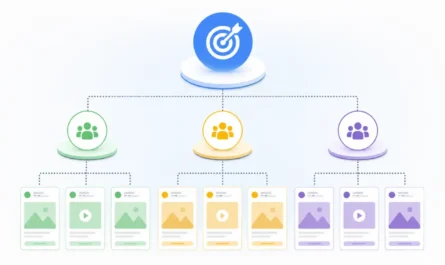
If you’ve spent any time in Ads Manager, you’ve probably noticed that Meta doesn’t ask “what do you want to sell” first, it asks what result you’re chasing. One of the six core objectives sitting inside that menu is Engagement, and it’s often the most misunderstood one on the list. Businesses use this objective when their primary goal is to encourage meaningful interactions with their content rather than simply increasing exposure. Meta’s advertising system optimizes delivery toward people who are statistically more likely to interact with your ad. Depending on the engagement goal you select, those interactions can include reactions, comments, shares, video views, messages, event responses, or other supported engagement actions.
This article explains how the Engagement objective works, the available engagement goals, optimization options, performance metrics, and best practices for running successful campaigns.
1. What Is an Engagement Campaign?
At its core, this objective tells Meta’s algorithm to prioritize people who are more likely to take engagement actions, such as interacting with your content or starting conversations. Instead of showing your ad to the widest possible group, the system narrows delivery toward accounts that have a track record of engaging with comparable content, using historical signals like past likes, comment activity, video completion rates, and message replies to predict who’s likely to engage next.
Delivery itself has evolved recently, too. Meta’s AI-powered advertising system, including its Andromeda retrieval engine, evaluates signals such as ad creative, historical engagement patterns, and campaign objectives to help determine which people are most likely to respond. As Meta continues shifting toward AI-driven delivery, high-quality creative has become an increasingly important signal alongside audience settings rather than a replacement for them. In practical terms, that means the creative you upload is doing more of the targeting work than it used to, and running several distinct creative variations matters as much as, or more than, narrowing your audience settings by hand.
2. Types of Engagement Goals
Within this single objective, Meta supports several distinct sub-goals, and picking the wrong one is a common source of disappointing results:
- Post interactions (likes, comments, shares, saves)
- Video views
- Message conversations
- Event responses
- Phone calls (limited to certain eligible ad accounts)
Each engagement goal optimizes delivery for a different type of user action, so selecting the one that best matches your campaign objective is essential.
3. How the Optimization Actually Works
Once you pick a goal, Meta treats that specific action as the optimization event and runs its machine learning models against it. Every new campaign goes through a learning phase typically the first several days or until it accumulates enough optimization events during which delivery is less stable and costs can fluctuate. After that window closes, the system settles into a more predictable delivery pattern and keeps refining as fresh data arrives, which is why frequent mid-flight edits can be counterproductive; they often reset the learning clock.
4. Performance Goals Within Engagement
Ads Manager lets you fine-tune further by selecting a specific performance goal:
- Maximize post interactions
- Maximize video views
- Maximize message conversations
- Maximize event responses
- Maximize calls
Some ad accounts may also offer optimization for Instagram profile visits or Facebook Page visits. Because Meta frequently updates Ads Manager, the available performance goals can vary by account, campaign setup, and region. If available, these goals help direct people to your social presence rather than encouraging engagement directly on an ad.
5. Conversion Locations
Engagement campaigns can direct that interaction toward several destinations:
- Directly on the ad itself
- A messaging app like Messenger or WhatsApp
- Your Facebook Page
- Your Instagram profile
- An event RSVP
- A phone call with your business
6. Placements
You can let Meta’s automatic placement system, often branded as Advantage+ Placements, distribute your ad across its full inventory, or you can manually restrict it to specific spots:
- Facebook Feed
- Instagram Feed
- Facebook Stories
- Instagram Stories
- Facebook Reels
- Instagram Reels
- Messenger
- Audience Network (where supported)
Meta recommends using Advantage+ Placements whenever possible, allowing its delivery system to automatically allocate impressions across eligible placements where it predicts the best results for your selected optimization goal. Manual placements remain available when advertisers need greater control.
7. Audience Targeting Options
Standard targeting tools all apply here:
- Core audiences built from demographics and interests
- Custom audiences built from your own customer data
- Lookalike audiences modeled on your best existing customers
- Advantage+ audience, Meta’s increasingly automated option that expands targeting on its own as it learns
Depending on your audience settings and campaign configuration, Meta’s AI may expand delivery beyond your initial audience signals when it predicts better performance. As a result, many advertisers combine broader targeting with high-quality creative and allow the system to optimize delivery over time instead of relying on highly restrictive audience settings.
8. Supported Ad Formats
Several formats are compatible with this objective, depending on what kind of interaction you’re chasing:
- Single image ads
- Video ads
- Carousel ads
- Collection ads
- Boosted versions of existing organic posts
- Dedicated Reels ads
9. Budget and Bidding
You can run either a daily or lifetime budget at the campaign or ad set level. Meta also offers several bid strategy options along with cost control settings where available, letting you cap what you’re willing to pay per result.
10. Creative Guidance That Actually Moves the Needle
Strong creative matters more here than in almost any other objective, since the entire premise depends on people wanting to respond. A few things consistently help:
- Visuals that stop the scroll rather than blend into the feed
- Captions written to prompt a reaction, question, or opinion
- Natural prompts for interaction rather than forced engagement-bait
- Clear calls to action matched to the specific goal you picked
- Creative refreshed on a regular cadence to avoid fatigue
Rather than refreshing creatives on a fixed schedule, monitor performance trends such as declining engagement, increasing frequency, rising cost per result, or falling click-through rates. When performance consistently deteriorates, introducing fresh creative can help maintain campaign effectiveness.
11. Metrics Worth Watching
Beyond the total count of engagements, it’s worth tracking a fuller picture:
- Engagement rate, reactions, comments, shares, saves
- Link clicks
- Video views and average watch time
- Conversations started and reply rate
- Event responses
- Cost per engagement, cost per conversation, cost per result
- Reach, impressions, frequency, and CTR where applicable
Meta periodically updates Ads Manager’s reporting metrics and attribution models, so the available metrics, naming conventions, and reporting options may change over time. When reviewing campaign performance, always use the metrics available in your account and verify the attribution settings before comparing results across different campaigns or reporting periods.
12. When This Objective Actually Makes Sense
This approach fits well in a few common scenarios:
- Growing interaction on existing posts
- Building momentum around video content
- Opening up messaging conversations with prospects
- Driving attendance to a Facebook event
- Building an active, responsive community around your brand
13. Best Practices
- Match the performance goal to your real objective
- Tailor creative to the specific audience segment
- Test several ad variations side by side
- Keep an eye on the quality of engagement, not just the quantity
- Let performance data guide adjustments rather than guesswork
- Watch frequency and CTR together rather than refreshing on autopilot
- Scale winning campaigns incrementally rather than all at once
14. Mistakes That Undercut Results
- Choosing the wrong performance goal for the outcome you actually want
- Running weak or generic creative
- Targeting audiences with no real relevance to the brand
- Chasing vanity metrics without connecting them to business value
- Ignoring the comments and messages the campaign generates
- Editing campaigns too aggressively during the learning phase
- Letting frequency climb until the same people see the ad too often
15. Where This Objective Falls Short
The Engagement objective is designed to optimize for interactions rather than purchases or leads. While increased engagement can strengthen brand awareness, build social proof, and encourage conversations with potential customers, it should not be evaluated using sales-focused metrics alone. If your primary goal is generating purchases, leads, or other conversion events, you should choose the campaign objective that optimizes for those actions. Engagement campaigns can still play an important role by building audience interest and trust, but their success should be measured using engagement metrics rather than direct revenue.
16. Summary
The Engagement objective is most effective when your goal is to increase interactions, build audience engagement, and strengthen your brand’s presence rather than drive immediate sales. Choosing the right performance goal, creating compelling ad creatives, monitoring meaningful engagement metrics, and allowing Meta’s optimization system enough time to learn can significantly improve campaign performance. Because Meta regularly updates Ads Manager, available performance goals, reporting metrics, and optimization options may change over time, so always review the options available in your account. From here, it’s worth exploring each engagement type Post Engagement, Video Views, Messages, Event Responses, and Calls in greater detail, as each has its own optimization behavior and best practices.