Meta Ads location targeting allows advertisers to control the geographic areas where their ads are eligible to reach people. It is an important part of audience setup because businesses usually serve customers within specific cities, regions, countries, or service areas.
A local restaurant may target people near its location, while an ecommerce business may target an entire country. Understanding location targeting helps advertisers build audiences that match where their products or services are actually available.
1. Understanding Location Targeting in Meta Ads
Location targeting lets advertisers select geographic areas where they want their ads to be eligible for delivery. Businesses can target broad areas such as countries and regions or more specific areas such as cities and available local areas. Depending on the location and available options, Meta may also provide postal code, address, drop-pin, or radius-based targeting.
For example:
- A restaurant may target its local service area.
- A coaching institute may target selected cities or states.
- An ecommerce brand may target an entire country.
- A global software company may target multiple countries.
The right location setup depends on where the business can actually serve customers.
2. Where Location Settings Are Found in Ads Manager
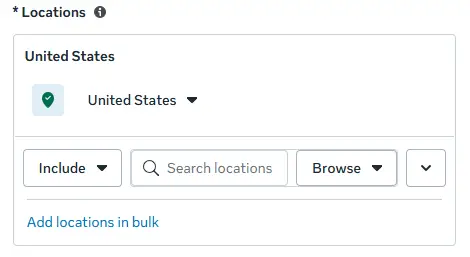
Location targeting is configured at the Ad Set level within the Audience section. This is where advertisers define the geographic areas they want to target along with other available audience settings. The exact options shown in Ads Manager can vary depending on the selected location, account, campaign setup, and Meta’s current interface.
3. Selecting Locations
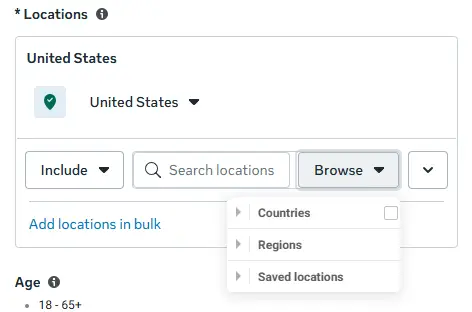
Advertisers can add locations using the location-selection tools available in Ads Manager.
- The search option allows advertisers to search for available locations such as countries, regions, cities, postal codes, or other supported geographic areas.
- The Browse option lets you explore available locations by geographic category, including countries and regions.
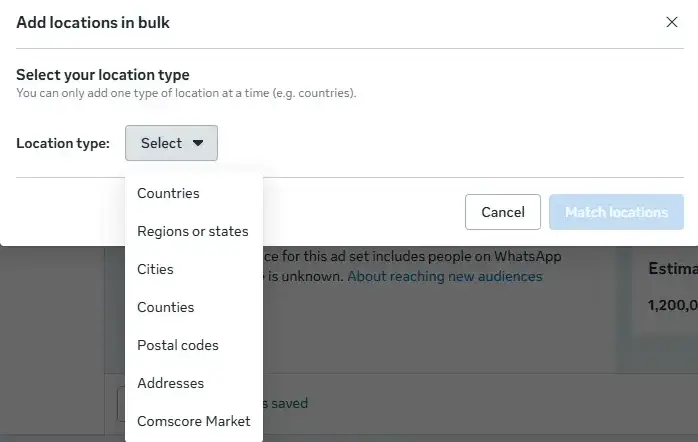
- Add locations in bulk allows advertisers to enter multiple locations at once, with locations separated by commas, instead of adding each location individually.
Meta may also provide saved locations functionality, which can make it easier to reuse frequently selected locations.
4. Location Types You Can Target
Meta provides different geographic targeting levels depending on the selected market and available options.
- Country: Country targeting is useful for businesses that serve customers across an entire country. Example: An ecommerce business shipping throughout India may target India.
- State or Region: State or region targeting is useful when a business operates within a specific part of a country. Example: A service provider operating across Punjab may target Punjab.
- City: City targeting is useful for businesses serving customers within specific cities. Example: A local business operating in Chandigarh may target Chandigarh.
- Neighborhood or Local Area: Where available, advertisers can target smaller geographic areas for more localized campaigns. This can be useful for restaurants, clinics, gyms, and local service providers.
- Postal Code: Postal code targeting may be available in selected markets and can help businesses define more specific service areas.
- Address: Advertisers may also be able to use a specific address or map location as the basis for geographic targeting. This can be useful for businesses advertising around a physical store, clinic, restaurant, or event location.
5. Drop-Pin and Radius Targeting
When a city is selected in Meta Ads Manager, advertisers may see options such as Current City Only and Cities Within Radius.
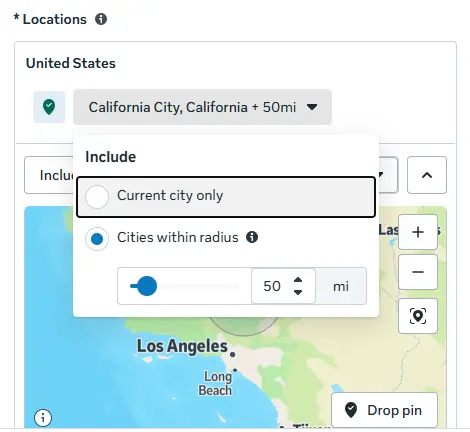
- Current City Only focuses targeting on the selected city.
- Cities Within Radius allows advertisers to expand geographic targeting around the selected city using a selected radius, where the option is available.
Meta may also provide a Drop Pin option for selecting a specific point on the map. This can be useful for businesses such as restaurants, clinics, gyms, and stores that want to target people around a particular location.
The availability of these options and the selectable radius can vary depending on the selected location, country, account, and Meta’s current Ads Manager interface.
6. Including and Excluding Locations
6.1 Including Locations
Including a location tells Meta which geographic areas should be part of the selected audience. Advertisers can include one location or multiple locations.
For example, a business could target:
- Delhi
- Punjab and Haryana
- Multiple cities
- Multiple countries
The selected locations should match the areas where the business can actually provide its product or service.
6.2 Excluding Locations
Exclusions allow advertisers to remove specific areas from a broader geographic target. For example, an ecommerce business targeting a country may exclude areas where it does not deliver. A local service business may also exclude areas outside its service zone.
6.3 Combining Include and Exclude
Include and exclude settings can be used together to create a more suitable geographic audience.
For example:
Include: Entire country
Exclude: Areas where delivery is unavailable
Or:
Include: Target city
Exclude: Areas outside the business’s service coverage
The purpose is to make the geographic audience better match the actual operating area of the business.
7. Location Overlap
Location overlap can occur when multiple ad sets or campaigns target geographic areas that contain one another.
For example, one ad set may target an entire country while another targets a state within that country. A third may target a city inside that state. These audiences can therefore overlap.
Overlap is not automatically a problem. Different campaigns may have different objectives, budgets, creatives, or strategies. However, advertisers should monitor location targeting when multiple ad sets compete for similar audiences. Avoid creating unnecessary location splits simply because smaller geographic areas are available.
8. How Meta Determines a Person’s Location
Meta uses available signals to estimate where a person is located and determine whether they fall within the geographic audience selected by the advertiser. Location can be estimated rather than perfectly verified, so advertisers should not assume that geographic targeting provides absolute physical-location precision.
For this reason, businesses should monitor actual campaign results and geographic performance after their ads are running. If leads, purchases, or other results consistently come from unsuitable areas, advertisers should review their location setup and service coverage.
9. Location Targeting and Advantage+ Audience
Meta increasingly uses automation to help determine who is most likely to respond to an ad. However, geographic targeting remains important because businesses still need to define where they can serve customers. Location should therefore be aligned with the actual geographic coverage of the business.
For example, a local business should not rely on audience automation to compensate for an incorrectly selected service area.
10. Estimated Audience Size and Location Targeting
The size of the selected geographic area directly affects the potential audience. A country-wide audience can contain millions of people, while a small city or radius can be much smaller. A location that is too broad may include people the business cannot serve. A location that is too narrow may unnecessarily restrict the available audience.
The goal is to select a geographic range that provides enough potential customers while remaining relevant to the business. Audience size estimates in Ads Manager should be treated as estimates rather than guaranteed reach or results.
11. Matching Location Strategy to Business Type
Different businesses may require different geographic strategies.
- Local Businesses: Restaurants, salons, gyms, clinics, and other local businesses may benefit from city-level, local-area, drop-pin, or radius-based targeting where available.
- Regional Businesses: Coaching institutes, regional service providers, and businesses operating across several cities or states may target selected regions or cities.
- National Businesses: Ecommerce brands and other businesses serving customers across an entire country may use country-level targeting.
- International Businesses: Businesses operating internationally can include multiple countries based on their markets and service availability.
The important principle is simple: target the locations where the business can realistically serve customers.
12. Common Location Targeting Mistakes
- Targeting Too Broadly: A business may target a large geographic area even though it only serves a small portion of it. This can reduce geographic relevance and potentially waste budget.
- Targeting Too Narrowly: Overly restrictive targeting can reduce the available audience and limit delivery.
- Ignoring Exclusions: If certain locations cannot be served, failing to exclude them can create irrelevant impressions, clicks, or leads.
- Using the Same Location Setup Everywhere: Different campaigns may serve different markets, so advertisers should review location settings rather than copying the same setup without consideration.
- Not Checking Geographic Performance: Advertisers should review where results are actually coming from instead of relying only on the initial targeting setup.
13. Analyzing Location Performance
After campaigns launch, advertisers can analyze geographic performance to understand which areas are generating results. Location-based analysis can help identify:
- High-performing cities
- Strong-performing regions
- Areas generating expensive results
- Locations producing low-quality leads
- Areas worth expanding into
- Locations that may need to be reduced or excluded
Advertisers can compare metrics such as cost per result, conversion rate, purchases, leads, and return on ad spend across geographic areas where the relevant reporting is available.
For example, if one city consistently generates purchases at a lower cost than other cities, the advertiser may consider giving that market greater attention.
Geographic performance should be evaluated using actual business results rather than assumptions about which locations should perform best.
14. Best Practices for Location Targeting
- Target only areas where the business can genuinely serve customers.
- Use the appropriate geographic level for the business.
- Use exclusions when certain areas cannot be served.
- Avoid unnecessary geographic fragmentation.
- Monitor geographic performance after campaigns launch.
- Compare cost and conversion performance across important locations.
- Adjust targeting based on actual business results.
- Consider localized messaging when different markets have meaningfully different customer needs.
- Review location settings when the business’s service area changes.
15. Conclusion
Location targeting is an important part of Meta Ads audience setup. It allows advertisers to define the geographic areas relevant to their business while Meta’s delivery systems help optimize ad delivery within the selected audience. The best approach is not simply to target the largest possible area. Instead, advertisers should align geographic targeting with their actual service coverage, monitor performance by location, and adjust their strategy based on real campaign results.