Setting up a Google Ads account without knowing how it’s organized is a bit like moving into a house without knowing where the rooms are. You can technically function, but you’ll waste a lot of time bumping into walls. Google Ads follows a fixed structure, and once that structure clicks, campaign management stops feeling like guesswork and starts feeling like a system. This piece walks through that structure from top to bottom, why each layer exists, and how they connect to each other.
1. What Is the Google Ads Account Hierarchy?
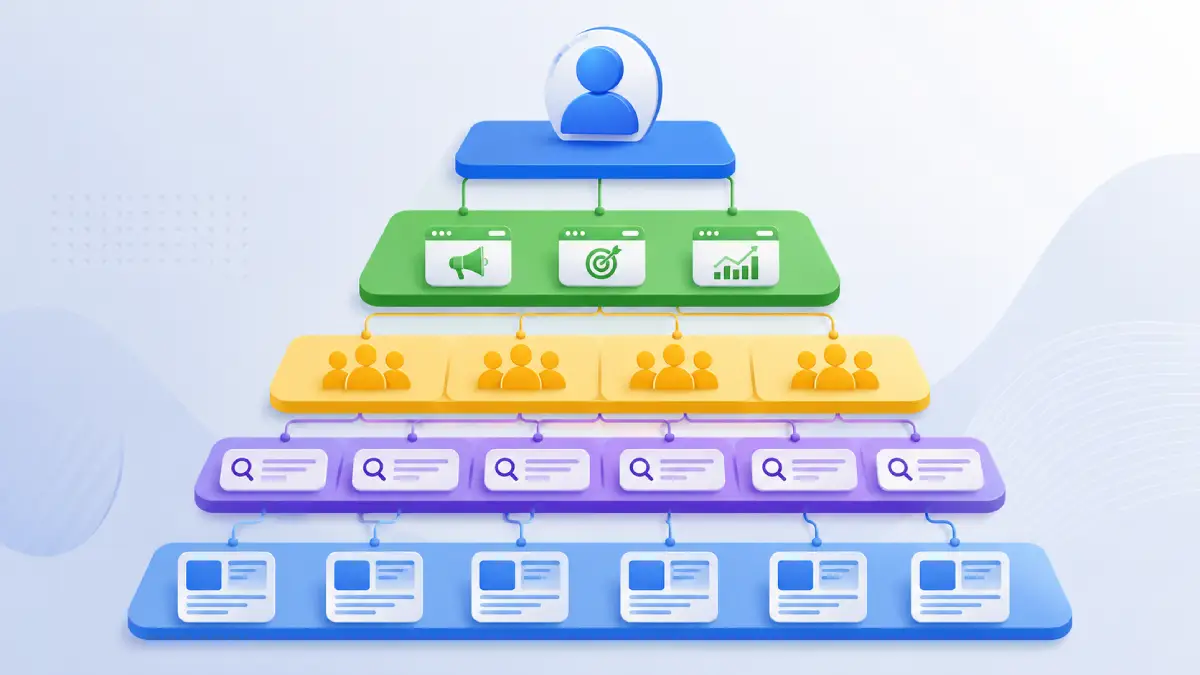
The Google Ads account hierarchy is the way everything inside your account is organized. Each level has a specific purpose and contains the level below it, making it easier to organize and manage your advertising campaigns. The hierarchy consists of five main levels: Google Ads Account, Campaign, Ad Group, Keywords, and Ads.
2. Google Ads Account
The Google Ads account is the master container. It typically represents one business and stores billing information, user access, and other account settings.
A few decisions made here are locked in for good time zone, currency, and country selection cannot be changed later, so this level deserves extra care before anything else is built.
3. Campaign
Sitting just below the account is the campaign. A campaign is essentially a container that groups ad groups and ads together, usually built around one specific goal or budget. A single Google Ads account can contain multiple campaigns, allowing businesses to organize advertising for different products, services, or goals.
Each campaign has its own settings, allowing you to organize your advertising based on different products, services, or business goals. This makes it easier to manage separate advertising efforts within the same Google Ads account.
4. Ad Group
Inside every campaign are ad groups. An ad group is a smaller collection of closely related ads and keywords sharing a common theme. Each ad group holds a set of related keywords, their matching ads, and typically one landing page.
Keeping closely related keywords and ads within the same ad group makes your campaigns easier to organize and manage. Each ad group should focus on a single product, service, or topic.
5. Keywords
Within each ad group are keywords the words or phrases that help determine when your ads may appear in Google Search results. Keywords should be closely related to the topic of the ad group so Google can match your ads with relevant searches.
6. Ads
Ads are the actual creative the headlines, descriptions, and any extensions a searcher sees on the results page. The ad is the final product of the campaign structure, shown to a customer when they type in a matching search query.
An ad group can contain one or more ads. A typical search ad includes headlines, descriptions, a display URL, and a final URL.
7. How the Google Ads Hierarchy Works
Put together, the hierarchy works from top to bottom. The Google Ads account contains one or more campaigns, each campaign contains one or more ad groups, and each ad group contains its own keywords and ads. This relationship helps keep your account organized and easy to manage.
This structured hierarchy makes it easier to organize your campaigns, keep related keywords and ads together, and manage your Google Ads account as it grows.
8. Performance Max and Account Hierarchy
Performance Max campaigns follow the same overall account structure but organize content differently. Instead of using traditional Ad Groups, they use Asset Groups to organize creative assets such as headlines, descriptions, images, videos, and logos that Google uses across its advertising channels.
If you’re using Search campaigns, you’ll mainly work with the standard hierarchy of Account, Campaign, Ad Group, Keywords, and Ads. Performance Max simply replaces Ad Groups with Asset Groups while remaining part of the same Google Ads account.
9. Conclusion
The Google Ads hierarchy starts with the account and continues through campaigns, ad groups, keywords, and ads. Each level has a specific purpose and works together to keep your advertising campaigns organized. Performance Max follows the same overall account structure but uses Asset Groups instead of traditional Ad Groups.
Understanding this hierarchy before creating campaigns helps you build a well-organized Google Ads account and provides a strong foundation for learning more advanced Google Ads concepts. Once you understand how these levels fit together, you’ll find it much easier to create, organize, and manage your Google Ads campaigns.