Google Ads has quietly become the engine behind a huge share of the ads you scroll past every day, yet most first-time advertisers have no real idea what happens between typing a search and seeing a result. Whether you’re a business owner weighing paid marketing or just curious how Google turns searches into revenue, here’s how the platform actually works, checked against how it runs today.
1. What Is Google Ads?
Google Ads is Google’s advertising platform that lets businesses pay to appear in front of people searching, watching YouTube, checking Gmail, or browsing websites in Google’s network. Instead of hoping customers stumble onto a website, advertisers bid for visibility at the exact moment someone is looking for something related to what they sell. Businesses use it because it reaches people who are already interested, rather than interrupting someone who isn’t. Compared to traditional advertising like TV or print, Google Ads offers measurable results you can see exactly how many people saw an ad, clicked it, and became customers, and you only pay when there’s real engagement.
2. History of Google Ads
The platform launched in October 2000 as Google AdWords, starting with roughly 350 advertisers on a pay-per-impression model. Google shifted to pay-per-click in 2002, letting businesses pay only when someone actually clicked. AdSense followed in 2003, letting websites host these ads for a share of revenue. Key milestones followed: site-specific targeting and Quality Score both arrived in 2005, remarketing launched in 2010, and App Campaigns rolled out in 2015 as mobile usage grew. In 2018, Google retired the AdWords name entirely, rebranding everything as Google Ads. Since then, the platform has moved steadily toward automation, with AI now assisting bidding, targeting, and even ad creation.
3. How Google Ads Works
A user searches on Google. The system scans active campaigns to find ads relevant to that query. Then comes the auction not a simple bidding war, but a calculation weighing how much an advertiser is willing to pay against how relevant and useful their ad is likely to be. Ads that win get displayed. If the user clicks, the advertiser is charged. This pay-per-click structure means businesses pay only for people who actually engage, not for people who ignore the ad.
4. Where Google Ads Can Appear
Ads show up across Google Search and its search partner sites, YouTube, the Google Display Network of partner websites, Gmail, Discover, Google Maps, and Google Shopping. More recently, ads have also started appearing alongside Google’s AI-generated search summaries, giving campaigns another place to surface besides the traditional results page.
5. Types of Google Ads Campaigns
Google Ads offers several campaign types, each built for a different goal:
Local: Campaigns built to drive visits to physical stores, showing up across Search, Maps, YouTube, and Display with a focus on nearby customers.
Search: Text ads that appear on Google’s search results when someone types a relevant query. Best for capturing people who are actively looking for something.
Display: Visual, banner-style ads shown across millions of partner websites in the Google Display Network. Good for building awareness while people browse other content.
Shopping: Product listings with images, prices, and store names, shown to people searching for items to buy. Pulled directly from a product feed rather than written ad copy.
Video: Ads that run on YouTube before, during, or alongside videos. Useful for reaching people through sight and sound rather than text.
Performance Max: A single automated campaign that pulls inventory from Search, Display, YouTube, Gmail, Maps, and Shopping at once, letting Google’s system decide where to place ads for the best results.
Demand Gen: Visually rich ads designed for platforms like YouTube, Discover, and Gmail, aimed at generating interest rather than just responding to a search.
App: Automated ads that drive app installs or in-app actions, shown across Search, Play, YouTube, and the Display Network from a single setup.
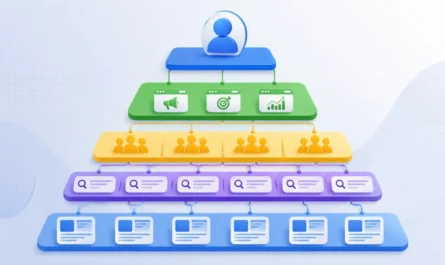
6. Google Ads Account Structure
Google Ads follows a clear hierarchy, with each level narrowing down from broad settings to specific ads:
Google Account: The starting point for everything. A regular Google Account (the same kind used for Gmail or Drive) is needed to sign in and create a Google Ads account.
Google Ads Account: The top-level account tied to billing, overall settings, and access permissions. All campaigns live inside this one account.
Campaign: Defines the budget, goal, and campaign type (Search, Display, Shopping, and so on). This is where daily spend limits and targeting basics like location and language are set.
Ad Group: Sits inside a campaign and groups together closely related ads and keywords. Splitting campaigns into tightly themed ad groups keeps ads more relevant to what triggers them.
Ads: The actual creative shown to users, including headlines, descriptions, images, or video, depending on the campaign type.
Keywords: The words or phrases within an ad group that trigger an ad to show, used mainly in Search campaigns.
Assets: Extra details attached to ads, such as phone numbers, site links, or location info, that add more information without needing a separate ad.
7. Understanding Keywords
Keywords are the words or phrases that trigger an ad. Match types control how strictly a search must align with them: broad match casts a wide net, phrase match requires the core phrase to appear, and exact match limits ads to close variations of the exact term. Negative keywords block ads from showing for irrelevant searches that would waste budget.
8. Understanding Search Intent
Not every search means the same thing. Informational searches are people looking to learn something. Navigational searches are people trying to reach a specific site or brand. Commercial searches show someone comparing options, and transactional searches mean they’re ready to buy right now. Matching ads to the right intent stage makes campaigns far more effective.
9. Landing Pages
A landing page is where someone arrives after clicking an ad. It matters because even a great ad fails if the page behind it is slow, confusing, or unrelated to what was promised. A solid landing page loads quickly, matches the ad’s message, and makes the next step obvious.
10. How Google Charges Advertisers
The dominant model is pay-per-click, meaning charges happen only when someone clicks. CPC is the actual cost per click. Some campaign types use CPM instead, charging per thousand impressions, useful for awareness goals. CPA, or cost per acquisition, ties spending to actual conversions rather than clicks or views.
11. Budget and Bidding Basics
Advertisers set a daily budget as a spending guardrail, and a bid representing what they’re willing to pay for a click or action. Smart Bidding uses machine learning to adjust bids automatically based on the likelihood of a conversion, taking much of the manual guesswork out of the process.
12. Quality Score
Quality Score is Google’s rating of how relevant and useful an ad is likely to be. It matters because higher scores can lower costs and improve position. The main factors are expected click-through rate, ad relevance to the keyword, and landing page experience.
13. Google Ads Metrics
A handful of core numbers show how a campaign is actually performing:
Conversion Rate: The percentage of clicks that turned into conversions, calculated as conversions divided by clicks. This shows how well traffic is actually turning into results, not just visits.
Impressions: The number of times an ad was shown, regardless of whether anyone clicked it. Reflects reach and visibility.
Clicks: The number of times people clicked on the ad. Shows how many users took the first step toward engaging.
CTR (Click-Through Rate) – The percentage of impressions that resulted in a click, calculated as clicks divided by impressions. A higher CTR usually signals a more relevant, appealing ad.
CPC (Cost Per Click): The average amount paid each time someone clicks the ad. Helps track how efficiently budget is being spent.
Cost: The total amount spent on a campaign, ad group, or keyword over a given period.
Conversions: The number of valuable actions completed after a click, such as a purchase, sign-up, or call.
14. Google Ads Policies
Ads are reviewed before going live. Approved ads run as scheduled; disapproved ones get flagged for policy violations and won’t show until fixed. Some content is restricted and can run with limitations, while other content is fully prohibited depending on the region.
15. Google Ads vs SEO
Paid ads deliver traffic almost immediately, while SEO builds organic visibility gradually. Paid positions stop the moment spending stops; organic rankings can hold steady with ongoing content work. SEO traffic is free but requires investment in time or services, while Google Ads is a direct paid cost with tighter control over exactly who sees the ad. Both are ongoing efforts in their own way PPC needs continuous budget and bid management, while SEO needs continuous content work. Traffic potential is essentially unlimited on both sides; the difference is how quickly that traffic shows up and how much control you have over it. Most businesses eventually run both together rather than picking one.
16. Conclusion
At its core, Google Ads is a simple exchange: businesses pay for visibility, and Google rewards the ads that are most relevant to the person searching. Everything else campaign types, keywords, Quality Score, bidding exists to make that match as precise as possible. As the platform leans further into automation and AI-driven placements, the fundamentals covered here still hold: understand your audience’s intent, structure your account clearly, track what actually converts, and let the data guide your next move. Get those basics right, and the rest of the platform becomes far easier to navigate.