Generating leads through Google Ads is only the beginning of the customer journey. A visitor may submit an enquiry today but become a qualified lead or paying customer days or weeks later. If businesses track only website form submissions, they may miss the actual value generated by their advertising campaigns. This creates a gap between online advertising activity and offline business results. Enhanced Conversions for Leads helps bridge this gap by connecting first-party customer information with subsequent conversion outcomes, giving businesses a more complete understanding of how their Google Ads campaigns contribute to meaningful results.
1. What Are Enhanced Conversions for Leads?
Enhanced Conversions for Leads is an upgraded approach to offline conversion imports in Google Ads. It uses hashed first-party customer information, such as email addresses and phone numbers, to supplement imported offline conversion data and improve conversion matching. The feature relies on customer information voluntarily provided through website forms or other direct interactions with a business. Before this information is sent to Google, it is normalized, such as converting email addresses to lowercase and removing unnecessary spaces, and then hashed using the SHA-256 algorithm.
Hashing converts the original information into a fixed-length string that is not directly readable. However, hashing is not encryption and does not automatically guarantee privacy or regulatory compliance. Google uses the hashed customer information to identify eligible matches with its available data and connect subsequent business outcomes with advertising interactions. This allows businesses to measure what happens after an initial enquiry, such as a qualified lead, signed contract, or completed sale, even when the outcome occurs offline.
2. How Enhanced Conversions for Leads Work
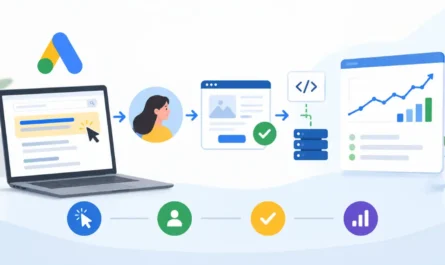
The process connects the initial advertising interaction with a subsequent offline business outcome through the following stages.
2.1 User Clicks on a Google Ad
A potential customer clicks a Google advertisement and visits the business website. Where available, an advertising identifier such as the Google Click ID (GCLID) is associated with the visit. This identifier helps connect subsequent conversions with the original advertising interaction.
2.2 User Browses the Website
The visitor explores the website, learns about the products or services, and decides whether to submit an enquiry.
2.3 User Submits a Lead Form
The visitor completes a form by providing information such as an email address or phone number. The website’s tagging setup captures the configured customer information and sends it to Google in hashed form. When configured appropriately, the Google tag can also capture relevant advertising identifiers, including GCLIDs, to support conversion matching.
2.4 Lead Information Is Stored in the CRM
The business stores the submitted information in its Customer Relationship Management (CRM) system. The CRM maintains customer details and tracks the lead’s progress through different stages, such as new enquiry, qualified lead, and converted customer. Consistent customer information is important because the business will use these records when uploading subsequent conversion events.
2.5 Lead Converts into a Customer
The sales team follows up with the enquiry. The lead may progress into a qualified lead, completed purchase, signed contract, or another valuable business outcome. The CRM records these changes so that businesses can report meaningful conversion stages rather than relying exclusively on initial form submissions.
2.6 Offline Conversion Data is Uploaded to Google Ads
When a lead reaches a meaningful conversion stage, the business uploads the corresponding offline conversion event to Google Ads using Data Manager or a supported integration. The uploaded information can include the conversion action, conversion timestamp, conversion value, and hashed customer information. Available click identifiers should also be included whenever applicable.
2.7 Google Matches the Conversion with Advertising Interactions
Google uses the uploaded customer information and available advertising identifiers to identify eligible matches with advertising interactions. When a match is established, the offline conversion can be attributed to the relevant Google Ads activity. The resulting conversion information becomes available for reporting and, where configured appropriately, campaign optimization.
3. Enhanced Conversions for Leads vs Traditional Offline Conversion Tracking
Traditional offline conversion imports primarily rely on click identifiers, such as GCLID, to connect offline business outcomes with advertising interactions. Businesses store these identifiers alongside lead records and upload them when a conversion occurs. Enhanced Conversions for Leads supplements this approach by adding hashed first-party customer information as an additional matching signal.
The main differences include:
- Matching information: Traditional imports primarily use click identifiers, while Enhanced Conversions for Leads can use hashed customer information alongside available identifiers.
- Additional matching opportunities: Customer-provided information can help establish eligible matches when a click identifier is unavailable or insufficient.
- Shared purpose: Both approaches measure outcomes that happen after the initial website interaction and connect them with advertising activity.
- Continued role of GCLID: Click identifiers remain valuable and should be included whenever available and applicable.
- Broader measurement: Enhanced Conversions for Leads can support additional measurement opportunities, including eligible cross-device and engaged-view conversions.
Enhanced Conversions for Leads therefore strengthens traditional offline conversion measurement rather than simply replacing it. It is also distinct from Enhanced Conversions for Web, which focuses on improving the measurement of conversions completed directly on a website.
4. Benefits of Enhanced Conversions for Leads
4.1 Improved Conversion Measurement
Hashed first-party customer information provides additional matching opportunities, helping Google connect more eligible offline conversion events with advertising interactions. This can produce more complete conversion reporting.
4.2 Better Lead Quality Measurement
A website form submission indicates interest, but it does not necessarily represent a valuable lead. Importing qualified-lead and converted-customer events helps businesses distinguish between initial enquiries and leads that generate meaningful business outcomes.
4.3 Improved Campaign Optimization
More complete conversion information helps Google’s automated bidding systems understand which advertising interactions contribute to valuable outcomes. Businesses can use qualified leads and converted customers as meaningful optimization signals instead of focusing exclusively on form submissions.
4.4 Better Advertising Performance Insights
Connecting website enquiries with subsequent sales provides better visibility into campaign effectiveness. Businesses can evaluate which campaigns and advertising activities generate meaningful leads and revenue-related outcomes.
5. Requirements for Implementing Enhanced Conversions for Leads
Before implementation, businesses should have the following in place:
- A Google Ads account with appropriate conversion tracking configured.
- A website with lead-generation forms that collect customer information.
- First-party customer data, such as email addresses or phone numbers, collected with appropriate permission.
- Google tag or Google Tag Manager, depending on the website’s tagging setup.
- A CRM or another system for storing and managing lead information.
- A process for recording qualified leads and completed sales.
- Consistent customer data normalization and SHA-256 hashing.
- A reliable method for uploading offline conversion events.
- Access to Google Ads Data Manager or a supported integration.
- Acceptance of Google’s Customer Data Terms and compliance with applicable privacy and consent requirements.
6. How to Set Up Enhanced Conversions for Leads
Google supports different methods for collecting customer information and connecting offline conversion data with Google Ads.
6.1 Enable the Unified Enhanced Conversions Setting
Enhanced Conversions for Web and Enhanced Conversions for Leads are now managed through a unified Enhanced Conversions setting in Google Ads. This allows advertisers to provide user-provided data through supported website tagging, Data Manager, and API connections without managing separate settings for the two approaches.
6.2 Configure Website Tagging Using Google Tag or Google Tag Manager
The Google tag or Google Tag Manager can be configured to collect first-party customer information from website lead forms. With Google Tag Manager, customer information can be collected from form fields or a data layer and passed to the appropriate conversion tag. The implementation must ensure that the correct customer information is captured and formatted before being sent to Google.
6.3 Connect CRM and Offline Conversion Data
The CRM provides the customer information and subsequent conversion outcomes required for offline imports. Businesses should maintain consistent customer records and accurately record conversion stages and timestamps. This ensures that the customer information submitted through the website can be used when reporting later business outcomes.
6.4 Import Offline Conversions Using Google Ads Data Manager
Google Ads Data Manager provides a way to connect data sources, process customer information, and import offline conversion events. It supports the use of available click identifiers and hashed first-party customer information for conversion matching. Google recommends Data Manager for new offline conversion integrations.
6.5 Use API Integration for Automated Conversion Uploads
Businesses with technical resources can use supported API integrations to automate offline conversion uploads from their CRM or other systems. Google has directed new offline conversion and Enhanced Conversions for Leads integrations towards the Data Manager API. Since June 15, 2026, access to relevant offline conversion upload functionality through the Google Ads API has been restricted for integrations that do not meet Google’s previous-usage eligibility requirements. Eligible existing integrations may retain legacy access. New integrations should therefore be planned around the Data Manager API.
7. Common Enhanced Conversions for Leads Issues and Mistakes
Several issues can affect implementation, conversion matching, and reporting:
- Incorrect customer information: Typos or inconsistent email addresses and phone numbers between website forms and CRM records can prevent successful matching.
- Improper normalization or hashing: Customer information must be normalized correctly before SHA-256 hashing. Incorrect formatting can result in mismatched values.
- Missing user-provided data: Incorrect tag configuration or form-field mapping can prevent customer information from being collected.
- Missing GCLID: Failure to retain available click identifiers can remove an additional matching signal.
- Incorrect conversion timestamps: Inaccurate conversion dates or times can affect offline conversion imports.
- Duplicate uploads: Uploading the same conversion event multiple times can inflate conversion counts.
- Incomplete CRM records: Missing customer information or conversion-stage details can make accurate offline imports difficult.
- Incorrect conversion action configuration: Incorrect conversion action mapping can prevent events from being reported against the intended conversion action.
- Consent and policy issues: Sending customer information without the required consent or appropriate policy compliance can create privacy and data-use problems.
- Failed uploads: Incorrect file formats, authentication problems, or integration errors can prevent conversion events from reaching Google Ads.
- Poor data synchronization: Delays or inconsistencies between the website, CRM, and Google Ads can result in missing or late conversion information.
8. Monitoring and Diagnosing Enhanced Conversions for Leads
After implementation, advertisers should regularly verify that customer information is being collected correctly and offline conversion events are reaching Google Ads.
Key areas to monitor include:
- Enhanced Conversions diagnostics: Review available diagnostics for missing or incorrectly formatted customer information and tagging problems.
- Customer information collection: Confirm that the configured website tagging implementation is capturing and sending the required first-party data.
- Conversion upload status: Check Data Manager or integration reports for accepted, delayed, and rejected conversion events.
- Data formatting and matching: Investigate warnings involving customer information, normalization, hashing, or conversion matching.
- Offline conversion diagnostics: Review errors related to timestamps, identifiers, and conversion action configuration.
- Lead and customer reporting: Confirm that qualified-lead and converted-customer events appear under the appropriate conversion actions.
- Conversion value and campaign performance: Compare Google Ads conversion reporting with CRM records to identify significant discrepancies.
When an issue is identified, correct its source, such as form-field mapping, customer data formatting, conversion configuration, or CRM synchronization, and then review diagnostics again to verify the improvement.
Conclusion
Accurate conversion tracking requires understanding what happens beyond the initial website enquiry. By connecting first-party customer information, CRM records, and offline conversion events, Enhanced Conversions for Leads helps businesses improve conversion measurement and provide better signals for campaign optimization. When implemented correctly, it offers a clearer picture of how Google Ads contributes to qualified leads, actual customers, and valuable business outcomes.