
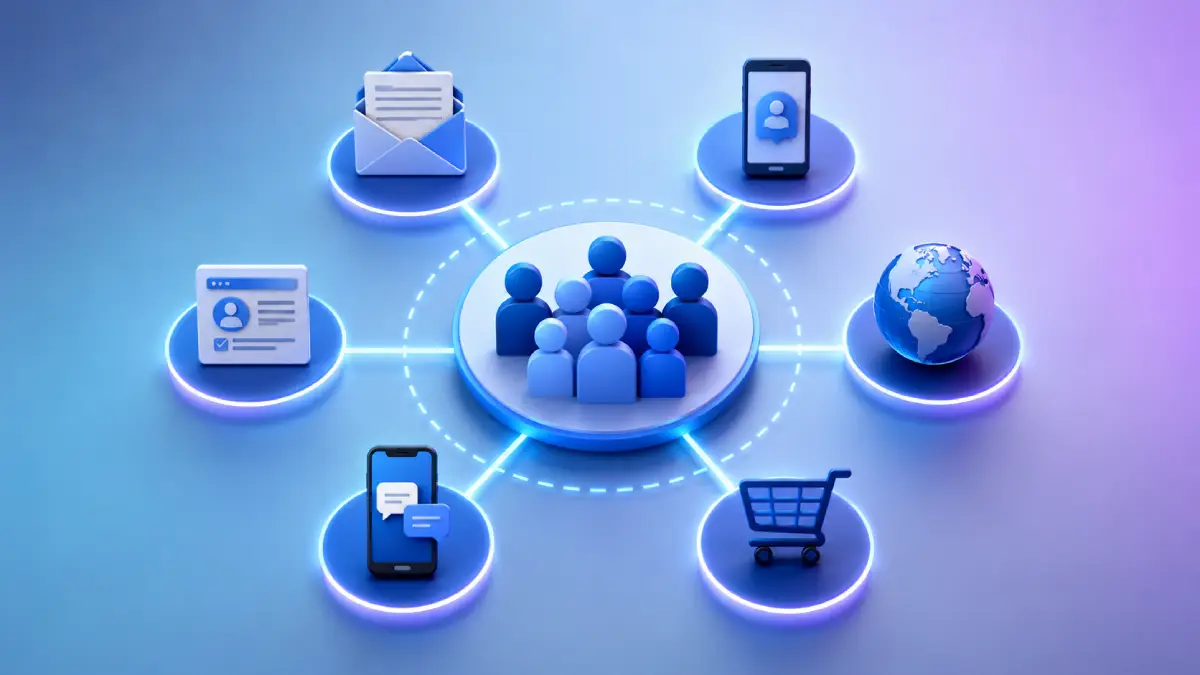
Custom Audiences are one of the most practical targeting tools available in Meta Ads. Advertisers use them to reach people who have already shown interest in a business, rather than starting with a completely cold audience. Because Custom Audiences are built from a business’s own customer information or activity data, they play a central role in reaching people who have previously interacted with that business, whether through a website, an app, a customer list, or engagement on Facebook or Instagram. This guide explains what Custom Audiences are, how they work, where they come from, and how to create and use them effectively.
1. What Are Custom Audiences in Meta Ads?
A Custom Audience is an audience created from eligible existing customer information, website activity, app activity, or interactions with Meta properties. Instead of targeting people based on general interests or demographics, advertisers use Custom Audiences to reconnect with people who already have some relationship with the business.
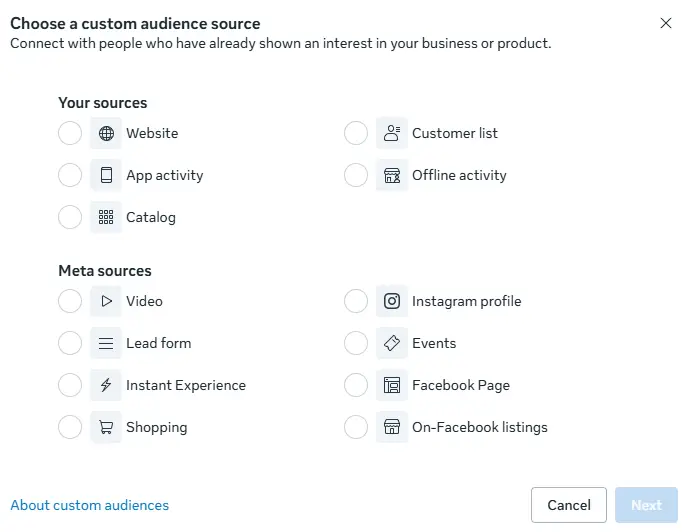
The basic concept is simple:
Existing customer data or interactions → Custom Audience → Audience targeting
For beginners, it helps to think of a Custom Audience as a bridge between information a business already has, such as a customer list or website activity, and the ability to show ads specifically to those people on Meta platforms.
2. How Custom Audiences Work
Creating and using a Custom Audience generally follows this workflow:
- Select an audience source, such as a customer list, website, app, or Meta engagement data.
- Choose the available audience conditions for that source.
- Meta processes the source data or activity.
- The audience becomes available for use once processing is complete.
- The audience can then be selected for eligible advertising purposes.
Audience size and availability depend on several factors, including the source type, the amount of data provided, how well that data matches Meta accounts, recent activity levels, and privacy-related limitations. A small customer list or low website traffic, for example, may result in a smaller audience.
3. Types of Custom Audiences
Custom Audiences can be created from different types of eligible data and activity. These sources can be broadly understood as business-owned sources and Meta sources.
3.1 Business-Owned Sources vs Meta Sources
The main difference is where the audience information or activity originates.
Business-owned sources use customer information or activity connected to the business’s own customer data, website, or app. Examples include customer lists, website visitors, and app activity.
Meta sources use eligible interactions that people have with the business on Meta platforms. Examples include Facebook engagement, Instagram engagement, video engagement, and lead form engagement.
In simple terms, business-owned sources are based on information or activity connected to the business’s own data and digital properties, while Meta sources are based on eligible interactions that happen within Meta’s platforms.
Both types can be used to build Custom Audiences for retargeting, re-engagement, exclusions, and other eligible targeting purposes. The available audience conditions and retention options depend on the specific source.
3.2 Business-Owned Sources
Business-owned sources are based on customer information or activity connected to the advertiser’s own business systems, website, or app.
3.2.1 Customer List Custom Audience
A Customer List Custom Audience is built by uploading eligible customer information, such as contact details, so Meta can match the information to existing accounts. This type is commonly used to re-engage past purchasers, reach existing subscribers, or reconnect with contacts from a CRM.
Because this method relies on customer data, businesses should ensure the information is collected and used appropriately and only includes data they have the right to use.
3.2.2 Website Custom Audience
A Website Custom Audience is built from eligible activity on a business’s website. Depending on the setup, advertisers can create audiences based on:
- All website visitors within a selected period
- Visitors to specific pages
- Visitors who took certain on-site actions, where available
This type supports website retargeting, allowing a business to reach people who have already shown interest in its website.
3.2.3 App Activity Custom Audience
An App Activity Custom Audience is built using eligible activity from a business’s app, such as app opens, in-app actions, or other tracked events.
This allows advertisers to re-engage people who have already interacted with their app, encouraging return visits, additional actions, or continued engagement.
3.3 Meta Sources
Meta sources are based on eligible interactions that people have with a business’s content, Page, profile, forms, videos, or other supported experiences on Meta platforms.
These audiences are created from interactions that take place within Meta’s ecosystem rather than from customer information directly uploaded by the advertiser.
3.3.1 Facebook Engagement Custom Audience
A Facebook engagement Custom Audience is built from eligible interactions with Facebook properties, such as engagement with a Facebook Page or other supported Facebook content.
It can be used to reconnect with people who have already interacted with the business on Facebook.
3.3.2 Instagram Engagement Custom Audience
An Instagram engagement Custom Audience is built from eligible interactions with an Instagram account or other supported Instagram experiences.
This allows advertisers to reach people who have already engaged with the business on Instagram.
3.3.3 Video Engagement Custom Audience
A Video Engagement Custom Audience is built from eligible interactions with video content. Depending on the available options, advertisers may be able to target people based on their level of engagement with videos.
For example, an advertiser may want to reach people who watched a meaningful portion of a video rather than everyone who encountered it.
3.3.4 Lead Form Engagement Custom Audience
A Lead Form Engagement Custom Audience is based on eligible interactions with Meta lead forms.
This can be useful for re-engaging people who interacted with a lead form, including situations where they did not complete the desired action.
3.3.5 Other Meta Engagement Sources
Meta may provide additional engagement-based Custom Audience sources depending on the account, advertising setup, and features available at the time.
Available options can change, so advertisers should check the Custom Audience sources displayed in their Meta Ads account when creating an audience.
4. Custom Audience Retention Period
The retention period determines how long a person can remain eligible within certain activity-based Custom Audiences. Retention limits vary by audience source and type, so not every Custom Audience uses the same retention window.
For some eligible audience sources or events, Meta offers expanded retention options, including cases where a 730-day maximum is available. However, this is not a universal setting that applies to every Custom Audience.
A longer retention period is not automatically better. Advertisers should choose a retention period appropriate to their typical customer journey. A short retention period may suit fast purchase cycles, while a longer period may better fit considered purchases with longer research phases.
Selecting the right retention window helps keep the audience relevant to current business goals.
5. How to Create a Custom Audience
The general process for creating a Custom Audience is:
- Open Meta Ads Manager.
- Go to Audiences.
- Select Create Audience.
- Select Custom Audience.
- Choose the appropriate source.
- Configure the available conditions for that source.
- Select the retention period, where applicable.
- Give the audience a descriptive name.
- Create the audience.
- Wait for processing and check its status before using it.
Processing time and available conditions can vary depending on the source selected.
6. How Custom Audiences Are Used
Custom Audiences support several practical targeting uses, including:
- Retargeting website visitors who did not complete a desired action
- Re-engaging Meta users who interacted with content, videos, or lead forms
- Reaching previous customers with relevant offers
- Following up with people who submitted a lead form
- Reaching eligible app users to encourage continued use
- Excluding existing audiences from campaigns aimed at new customers
These uses allow advertisers to tailor messaging based on a person’s previous relationship with the business.
7. Custom Audience Exclusions
Custom Audiences can also be used as exclusions rather than inclusions. Common examples include:
- Excluding existing customers from acquisition-focused campaigns
- Excluding people who already completed a specific action, such as a purchase
- Preventing unnecessary retargeting of people who no longer need to see certain ads
- Separating existing customers from prospective customers in campaign targeting
Using exclusions helps keep messaging relevant and avoids showing the same ads to people who have already converted.
8. Custom Audiences vs Other Audience Types
8.1 Custom Audiences vs Lookalike Audiences
A Custom Audience is based on an existing eligible data source or audience, such as a customer list or website visitors. A Lookalike Audience is designed to find new people who share characteristics with a chosen source audience.
In simple terms, Custom Audiences reach known people, while Lookalike Audiences help reach new people.
8.2 Custom Audiences vs Saved Audiences
A Custom Audience is built from data or activity tied to a specific source, while a Saved Audience is typically built from selected targeting criteria, such as location, demographics, or interests, rather than existing customer data.
9. Custom Audience Best Practices
- Use clear, descriptive audience names
- Organize audiences by source and purpose
- Select a retention period appropriate to the customer journey
- Avoid creating unnecessary duplicate audiences
- Use exclusions where relevant to avoid overlap
- Keep customer information accurate and up to date
- Use customer data appropriately and only with proper rights
- Regularly review audience status and availability
- Avoid overly narrow audience conditions that limit audience size unnecessarily
- Review Meta’s current requirements when using customer lists
10. Common Custom Audience Problems
- Audience Too Small: This can result from a small source audience, limited website traffic, a small customer list, or overly narrow audience conditions.
- Audience Still Processing: Some audiences require processing time before becoming available for use.
- Customer List Matching Lower Than Expected: Not every uploaded customer record will necessarily match to an eligible Meta account. This can affect the final audience size.
- Website Audience Not Populating: Possible factors include insufficient site activity, tracking configuration issues, restrictive audience conditions, or privacy-related limitations.
11. Privacy and Data Considerations
Customer data used to build Custom Audiences should be collected and used appropriately, following applicable privacy and data-handling requirements. Privacy restrictions can affect both audience availability and measurement accuracy.
Additionally, platform-level privacy changes, such as those introduced by Apple, can affect certain data collection and measurement scenarios relevant to some Custom Audience sources. Advertisers should therefore review their tracking setup and Meta’s current requirements when using customer or activity-based audiences.
12. Recent Custom Audience Changes
Recent changes to Custom Audiences have included expanded retention options for some eligible audience sources or events, along with ongoing adjustments to customer-list data requirements.
When a longer retention window is available, it applies to specific eligible sources or events rather than automatically applying to every Custom Audience type. Advertisers should check the options available in their Meta Ads account instead of assuming that one retention rule applies universally.
13. Conclusion
Custom Audiences allow advertisers to reach people who have already interacted with their business, whether through a customer list, website activity, app usage, or engagement with Meta content.
They are created by selecting a source, configuring the available conditions, and allowing Meta to process the data before the audience becomes available. Retention periods vary by source and should be chosen based on the typical customer journey rather than automatically selecting the longest available option.
Beyond targeting, Custom Audiences are equally useful as exclusions, helping keep campaigns focused and relevant. Choosing the right source, conditions, and retention period is what makes Custom Audiences an effective and precise part of a Meta Ads targeting strategy.