
Claude Skills give Claude a structured way to use specialized instructions, resources, and workflows for recurring tasks. Instead of providing the same detailed process in every interaction, users can package that knowledge into a reusable Skill that Claude can access when relevant. For anyone exploring AI tools, automation, or specialized AI workflows, Claude Skills provide a way to make recurring tasks more consistent and organized. This article explains what Claude Skills are, how they work, what a Skill contains, how Skills differ from ordinary prompts, practical use cases, how to create one, and how Skills relate to MCP.
1. What Are Claude Skills?
A Claude Skill is a packaged set of instructions that can also include scripts, reference material, templates, and other resources for handling a specific type of task. Skills are designed for workflows that benefit from having the same process, rules, or specialized knowledge available repeatedly. Instead of explaining a multi-step process from scratch every time, the process can be organized into a Skill. Claude can then use those instructions when a request matches the Skill’s purpose.
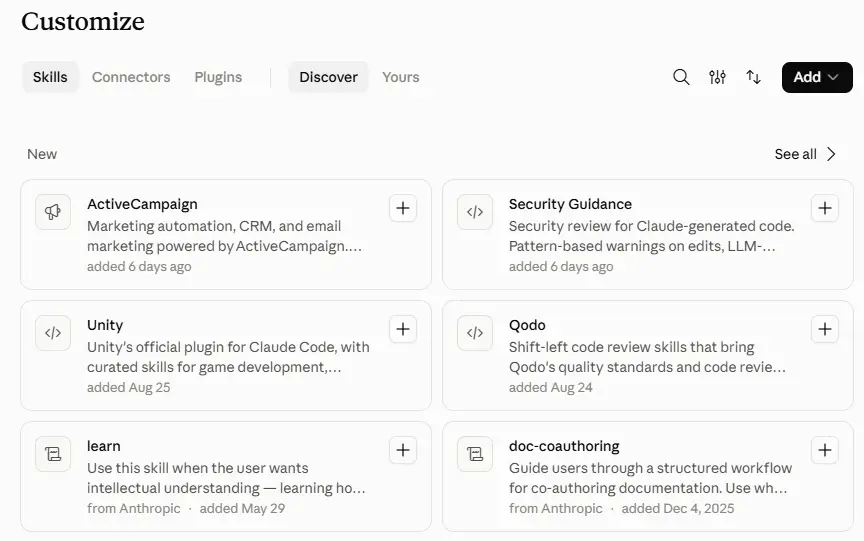
This is different from simply asking Claude to perform a task in a single prompt. A prompt provides instructions for a particular interaction, while a Skill packages reusable instructions and supporting resources for a recurring workflow. Skills do not retrain Claude’s underlying model. Instead, they give Claude additional procedural knowledge and resources that can be used when needed.
2. How Claude Skills Work
Claude Skills use a process called progressive disclosure to make relevant information available when it is needed rather than loading every Skill in full at the beginning.
The general process works like this:
- Skill discovery: Claude has access to lightweight information about available Skills, including their names and descriptions.
- Relevance matching: Claude determines whether a Skill is relevant to the user’s request.
- Instruction loading: When a Skill is relevant, Claude can load its
SKILL.mdfile, which contains the core instructions. - Resource access: If those instructions refer to additional reference files, templates, or other resources, Claude can access the information required for the task.
- Script execution: If a Skill contains appropriate scripts, Claude can use them for tasks where executing predefined code provides more predictable results.
This staged approach helps avoid loading unnecessary information into context and allows Skills to contain more detailed resources without requiring everything to be provided at once.
3. What Is Inside a Claude Skill?
A Skill is a directory rather than a single file. Its main entry point is the SKILL.md file, but the directory can contain additional resources that support the workflow.
A typical Skill can include:
- YAML frontmatter: The
SKILL.mdfile includes metadata such as the Skill’s name and description. - Instructions: Plain-language directions that explain how the workflow should be performed.
- Reference files: Detailed information that Claude can access when the task requires it.
- Scripts: Code that can be executed for tasks where repeatable or deterministic processing is useful.
- Other resources: Templates, examples, or supporting files required by the workflow.
A simple Skill directory might contain SKILL.md alongside separate folders for references and scripts. The SKILL.md file acts as the main instruction file, while the complete Skill includes the supporting files and resources around it.
Agent Skills have also been introduced by Anthropic as an open standard, designed to make Skills more portable across compatible AI environments rather than limiting the format to a single Claude interface.
Claude Skills can be pre-built or custom: Anthropic provides pre-built Skills for supported workflows, while users and organizations can create custom Skills for their own specialized processes, instructions, resources, and scripts.
4. Claude Skills vs Prompts
A prompt is an instruction provided for a particular interaction. It is useful for one-time requests, simple tasks, or situations where the requirements change frequently.
Claude Skills are designed for workflows that need to be reused. Instead of repeatedly explaining the same process, users can package the instructions and supporting resources into a Skill.
For example, a prompt might tell Claude to format a report according to a particular set of instructions. A Skill could contain the complete reporting workflow, formatting requirements, reference material, templates, and potentially scripts needed to repeat that process.
This does not mean Skills replace prompts. Prompts remain useful for unique or straightforward tasks, while Skills are more appropriate when a workflow is repeated and consistency matters.
5. What Can Claude Skills Be Used For?
Claude Skills are particularly useful for workflows that follow a repeatable process. Examples include:
- Document workflows: Creating or formatting documents according to a defined structure or set of requirements.
- Spreadsheet workflows: Building, analyzing, or modifying spreadsheets using consistent formulas, layouts, or procedures.
- Presentation creation: Applying a defined structure, formatting approach, or visual standard to presentations.
- PDF workflows: Handling PDF-related tasks using a standardized process.
- Coding workflows: Applying specific development procedures, coding standards, or project conventions.
- Research processes: Following a defined method for gathering, organizing, verifying, and presenting information.
- Organization-specific procedures: Applying internal processes, reporting standards, templates, or style requirements.
The main purpose is not simply to make Claude perform a task. It is to provide a reusable workflow that can be applied consistently when the same type of task occurs again.
6. How to Create a Claude Skill
Creating a Skill generally involves turning a repeatable workflow into a structured set of instructions and resources.
The process can be broken down into several steps:
- Identify a repeatable workflow: Choose a task that occurs often enough to benefit from reusable instructions.
- Create the Skill directory: Set up a dedicated folder for the Skill and its related resources.
- Create
SKILL.md: Use this file as the central instruction document for the Skill. - Add metadata and instructions: Give the Skill a clear name and description, then explain how the workflow should be performed.
- Add supporting resources: Include reference documents, templates, examples, or scripts when they are useful.
- Test the Skill: Run realistic tasks to see whether Claude recognizes and follows the workflow correctly.
- Refine the Skill: Improve the instructions, descriptions, and supporting resources based on the results.
Simple Skills can primarily consist of instructions and reference material, while more advanced Skills may use scripts and other resources.
7. Claude Skills and MCP
Claude Skills and Model Context Protocol (MCP) address different parts of an AI workflow.
Claude Skills package reusable instructions, procedural knowledge, and workflows that explain how a task should be approached.
MCP provides a standardized way for AI applications to connect with external tools, services, and data sources.
The two can work together. For example, a Skill could define the steps for completing a particular business workflow, while an MCP connection could provide access to the external system or data required to complete those steps.
In simple terms:
Skills provide the workflow and procedural knowledge, while MCP can provide connections to external capabilities and information.
Neither replaces the other because they solve different problems.
8. Benefits and Limitations of Claude Skills
8.1 Benefits
- Reusable workflows: Instructions do not need to be recreated for every recurring task.
- More consistent execution: The same defined process can be applied across similar tasks.
- Less repetitive prompting: Users can avoid repeatedly providing lengthy workflow instructions.
- Specialized processes: Skills can contain domain-specific procedures and knowledge.
- Better organization: Instructions, references, scripts, and templates can be grouped together.
8.2 Limitations
- Quality depends on the instructions: Vague or incomplete instructions can lead to poor results.
- Skills require maintenance: Workflows and requirements can change over time.
- Discovery depends on useful metadata: An unclear name or description can make it harder for Claude to identify the appropriate Skill.
- Scripts introduce security considerations: Code and dependencies from untrusted sources should be reviewed carefully before use.
9. Best Practices for Claude Skills
A well-designed Skill should have a clear purpose and provide Claude with only the information and resources needed to perform that workflow effectively.
Follow these practices:
- Give each Skill a clear purpose: Avoid combining unrelated workflows into one Skill.
- Write an accurate name and description: These help Claude determine when the Skill is relevant.
- Keep
SKILL.mdfocused: Put the most important workflow instructions in the main file. - Use supporting files appropriately: Move detailed or rarely needed information into reference files when appropriate.
- Use scripts when useful: Predefined code can be valuable when a task benefits from predictable and repeatable execution.
- Test realistic scenarios: Test the Skill with the types of requests it is expected to handle.
- Review external Skills carefully: Inspect scripts, dependencies, and other resources from untrusted sources before using them.
10. Conclusion
Claude Skills give Claude a structured way to use specialized instructions, resources, and workflows for recurring tasks. Unlike a one-time prompt, a Skill packages reusable procedural knowledge that Claude can access when it is relevant. Skills can include a SKILL.md file, reference materials, scripts, templates, and other supporting resources. Their progressive disclosure approach allows relevant information to be loaded when needed, while the open Agent Skills standard is designed to support portability across compatible AI environments.
Skills also serve a different purpose from MCP: Skills define how a workflow should be performed, while MCP can connect Claude to external tools, systems, and data. When designed and tested properly, Claude Skills can make recurring AI workflows more organized, reusable, and consistent.